# Solution Details

### **Instructions for Viewing Solution Details on the DBR77 Platform**

### **Navigate to the "Solutions" Tab**

1. **Access the Marketplace**: Go to the product menu on the DBR77 platform and select the **"Marketplace"**.
2. **Open the "Solutions" Tab**: Click on the **"Solutions"** tab and select **"All"**.
3. **Select a Solution**: Choose a solution from the list and click on **"Details"**.

[![Zrzut ekranu 2024-09-30 o 10.57.55.png](https://learn.dbr77.com/uploads/images/gallery/2024-09/scaled-1680-/0JOktd1XbHzQ15VU-zrzut-ekranu-2024-09-30-o-10-57-55.png)](https://learn.dbr77.com/uploads/images/gallery/2024-09/0JOktd1XbHzQ15VU-zrzut-ekranu-2024-09-30-o-10-57-55.png)
### **Solution Detail View**

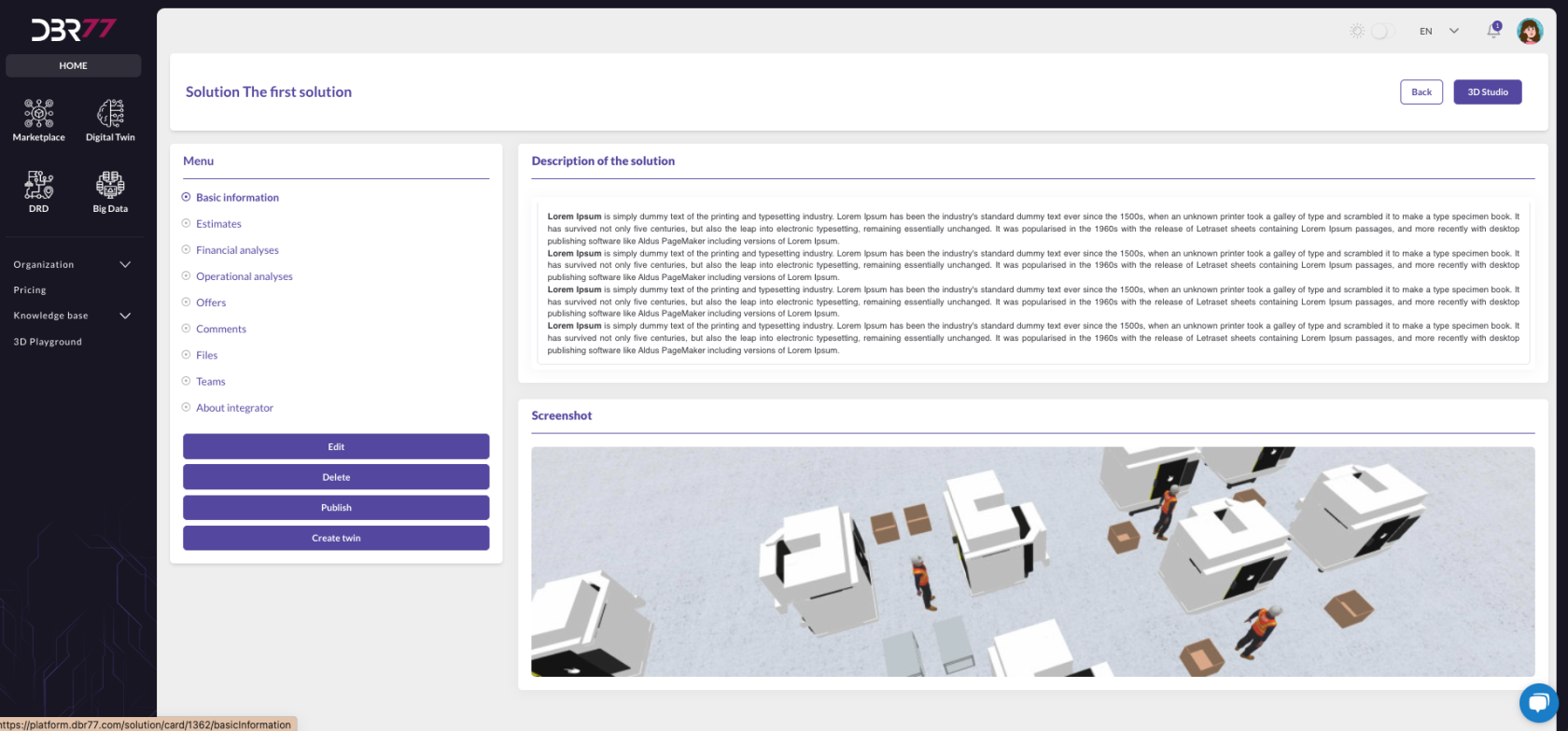
The detail view for the solution, such as *"The First Solution"*, is displayed in the main area of the DBR77 platform.

#### **Main Area Layout**

The main area is divided into two panels:

1. **Solution Description**: A text field containing the solution's detailed description.
2. **Screenshot**: Below the description, a visualization or simulation of the solution's functionality is displayed.

### **Navigation Menu**

On the left side of the screen, a navigation menu provides the following tabs for the selected solution:

- **Basic Information**: Includes the solution's name, description, and 3D Studio view.
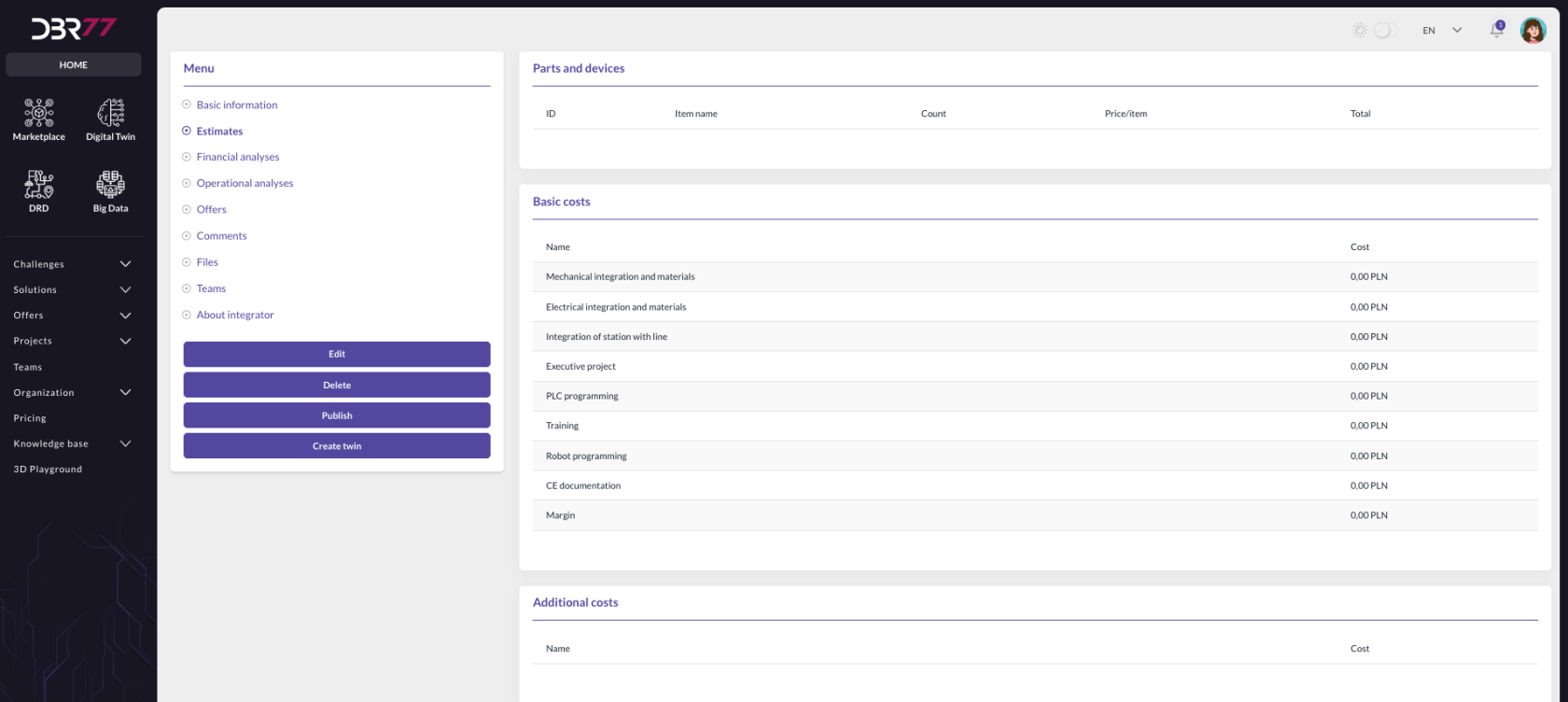
- **Cost Estimate**: Displays all calculations created in the 3D Studio.

[![Zrzut ekranu 2024-09-30 o 11.29.00.png](https://learn.dbr77.com/uploads/images/gallery/2024-09/scaled-1680-/db0hBh1Iv2CGZMFl-zrzut-ekranu-2024-09-30-o-11-29-00.png)](https://learn.dbr77.com/uploads/images/gallery/2024-09/db0hBh1Iv2CGZMFl-zrzut-ekranu-2024-09-30-o-11-29-00.png)
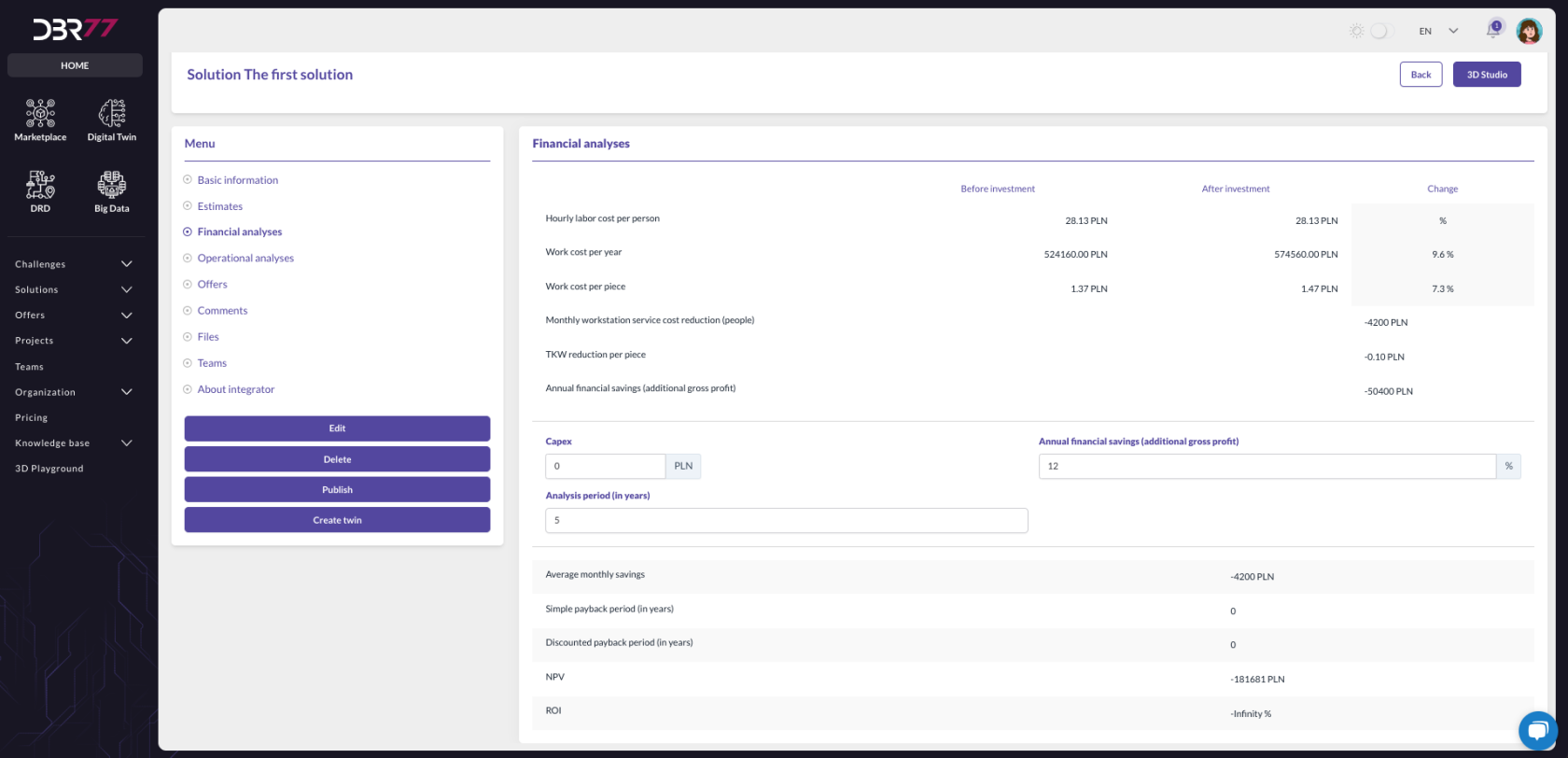
<div class="flex max-w-full flex-col flex-grow" id="bkmrk-analiza-finansowa-%E2%80%93-"><div class="min-h-8 text-message flex w-full flex-col items-end gap-2 whitespace-normal break-words [.text-message+&]:mt-5" data-message-author-role="assistant" data-message-id="14bb27ca-369b-4616-bc70-f244b3ae9460" dir="auto"><div class="flex w-full flex-col gap-1 empty:hidden first:pt-[3px]"><div class="markdown prose w-full break-words dark:prose-invert light">- **Financial Analysis**: Presents a financial analysis based on data from the technological challenge and the solution.

</div></div></div></div>[![Zrzut ekranu 2024-09-30 o 11.29.42.png](https://learn.dbr77.com/uploads/images/gallery/2024-09/scaled-1680-/uzNFv5ujHrHPJ7KH-zrzut-ekranu-2024-09-30-o-11-29-42.png)](https://learn.dbr77.com/uploads/images/gallery/2024-09/uzNFv5ujHrHPJ7KH-zrzut-ekranu-2024-09-30-o-11-29-42.png)

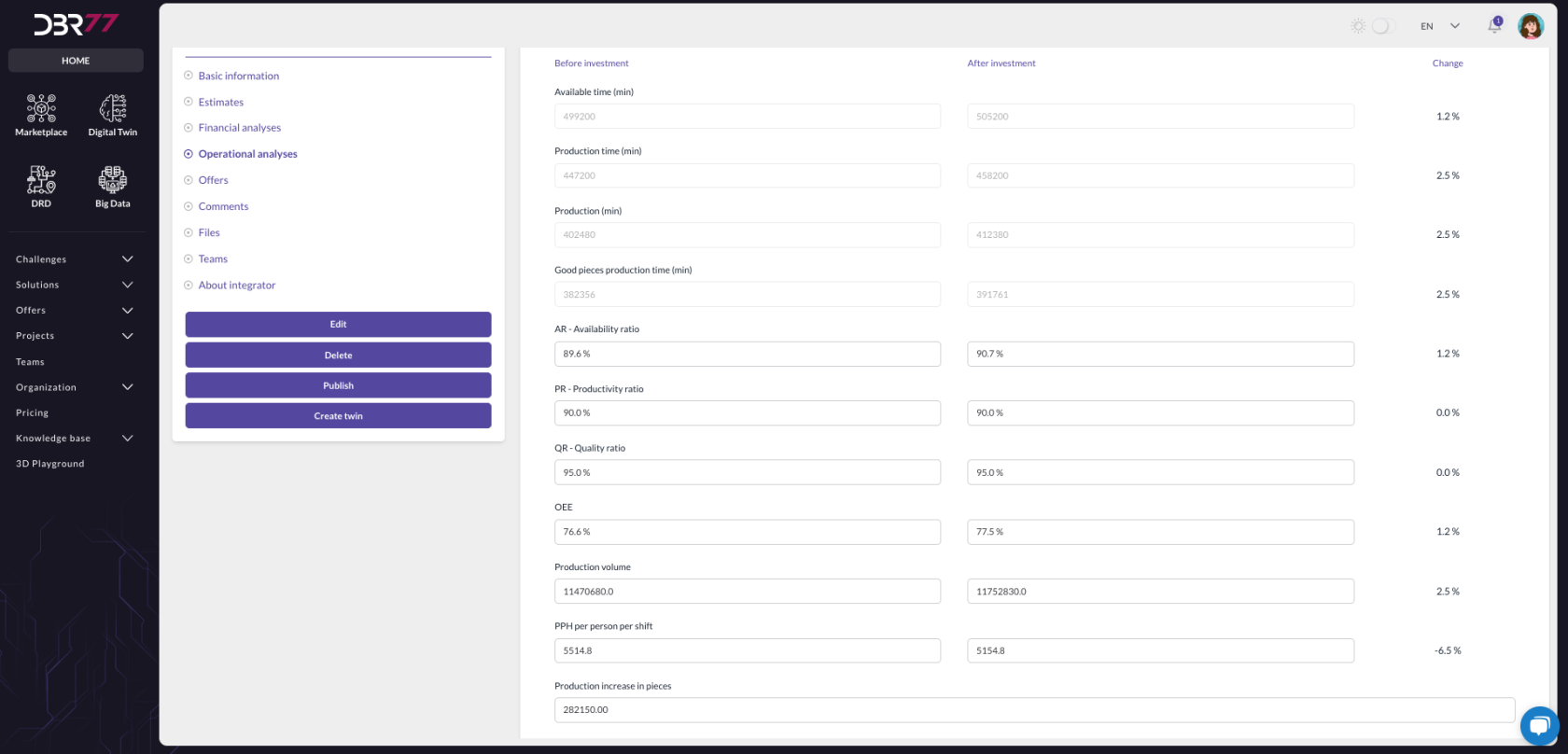
<div class="flex max-w-full flex-col flex-grow" id="bkmrk-analiza-operacyjna-%E2%80%93"><div class="min-h-8 text-message flex w-full flex-col items-end gap-2 whitespace-normal break-words [.text-message+&]:mt-5" data-message-author-role="assistant" data-message-id="14bb27ca-369b-4616-bc70-f244b3ae9460" dir="auto"><div class="flex w-full flex-col gap-1 empty:hidden first:pt-[3px]"><div class="markdown prose w-full break-words dark:prose-invert light">- **Operational Analysis**: Provides an operational analysis based on data from the technological challenge and the solution.

</div></div></div></div>[![Zrzut ekranu 2024-09-30 o 11.30.19.png](https://learn.dbr77.com/uploads/images/gallery/2024-09/scaled-1680-/hmzRFZaWlLfkTEJP-zrzut-ekranu-2024-09-30-o-11-30-19.png)](https://learn.dbr77.com/uploads/images/gallery/2024-09/hmzRFZaWlLfkTEJP-zrzut-ekranu-2024-09-30-o-11-30-19.png)

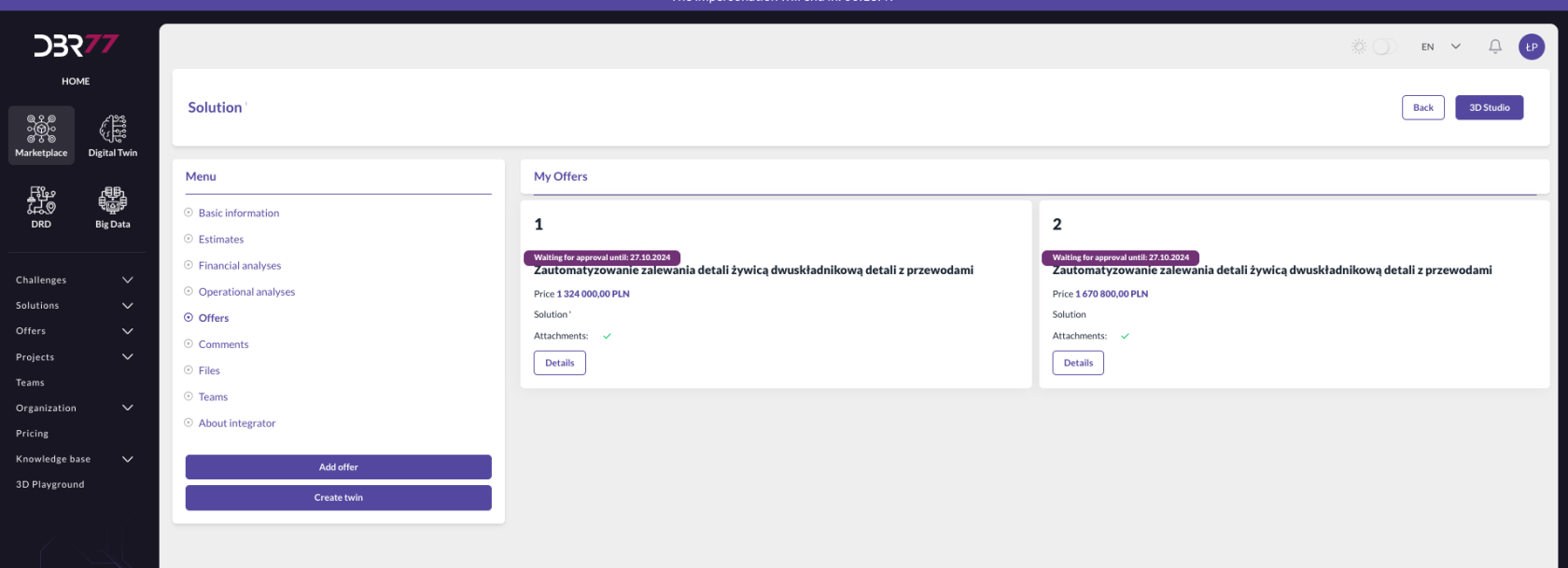
<div class="flex max-w-full flex-col flex-grow" id="bkmrk-oferty-%E2%80%93-widok-zawie"><div class="min-h-8 text-message flex w-full flex-col items-end gap-2 whitespace-normal break-words [.text-message+&]:mt-5" data-message-author-role="assistant" data-message-id="14bb27ca-369b-4616-bc70-f244b3ae9460" dir="auto"><div class="flex w-full flex-col gap-1 empty:hidden first:pt-[3px]"><div class="markdown prose w-full break-words dark:prose-invert light">- **Offers**: Lists all offers added to the selected solution.

</div></div></div></div>[![Zrzut ekranu 2024-09-30 o 11.45.08.png](https://learn.dbr77.com/uploads/images/gallery/2024-09/scaled-1680-/VVzAvESZTJWPQMiC-zrzut-ekranu-2024-09-30-o-11-45-08.png)](https://learn.dbr77.com/uploads/images/gallery/2024-09/VVzAvESZTJWPQMiC-zrzut-ekranu-2024-09-30-o-11-45-08.png)

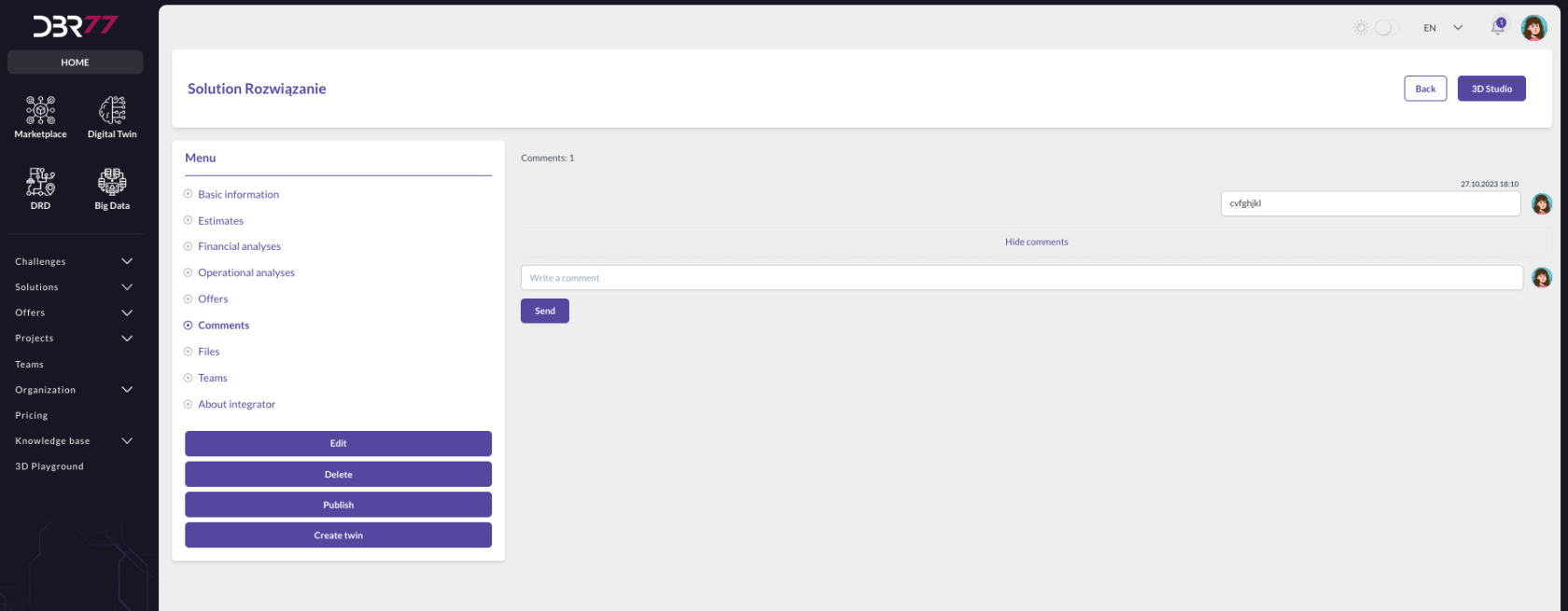
<div class="flex max-w-full flex-col flex-grow" id="bkmrk-komentarze-%E2%80%93-sekcja-"><div class="min-h-8 text-message flex w-full flex-col items-end gap-2 whitespace-normal break-words [.text-message+&]:mt-5" data-message-author-role="assistant" data-message-id="14bb27ca-369b-4616-bc70-f244b3ae9460" dir="auto"><div class="flex w-full flex-col gap-1 empty:hidden first:pt-[3px]"><div class="markdown prose w-full break-words dark:prose-invert light">- **Comments**: Shows comments associated with the solution.

</div></div></div></div>[![Zrzut ekranu 2024-09-30 o 12.02.46.png](https://learn.dbr77.com/uploads/images/gallery/2024-09/scaled-1680-/aw79kGV6UJ9mb056-zrzut-ekranu-2024-09-30-o-12-02-46.png)](https://learn.dbr77.com/uploads/images/gallery/2024-09/aw79kGV6UJ9mb056-zrzut-ekranu-2024-09-30-o-12-02-46.png)

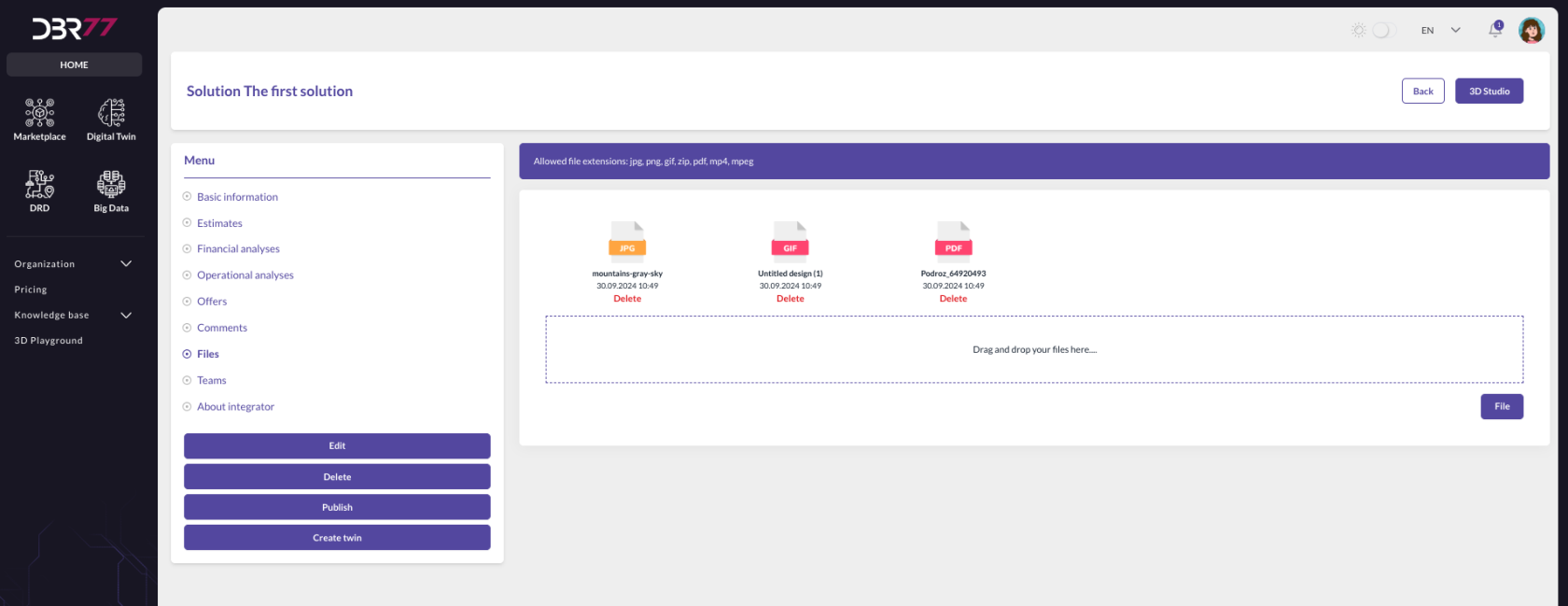
<div class="flex max-w-full flex-col flex-grow" id="bkmrk-pliki-%E2%80%93-widok-zawier"><div class="min-h-8 text-message flex w-full flex-col items-end gap-2 whitespace-normal break-words [.text-message+&]:mt-5" data-message-author-role="assistant" data-message-id="14bb27ca-369b-4616-bc70-f244b3ae9460" dir="auto"><div class="flex w-full flex-col gap-1 empty:hidden first:pt-[3px]"><div class="markdown prose w-full break-words dark:prose-invert light">- **Files**: Contains files uploaded by the solution author, which can be added at any time.

</div></div></div></div>[![Zrzut ekranu 2024-09-30 o 11.32.07.png](https://learn.dbr77.com/uploads/images/gallery/2024-09/scaled-1680-/1InY8o1Qnpws4VmR-zrzut-ekranu-2024-09-30-o-11-32-07.png)](https://learn.dbr77.com/uploads/images/gallery/2024-09/1InY8o1Qnpws4VmR-zrzut-ekranu-2024-09-30-o-11-32-07.png)

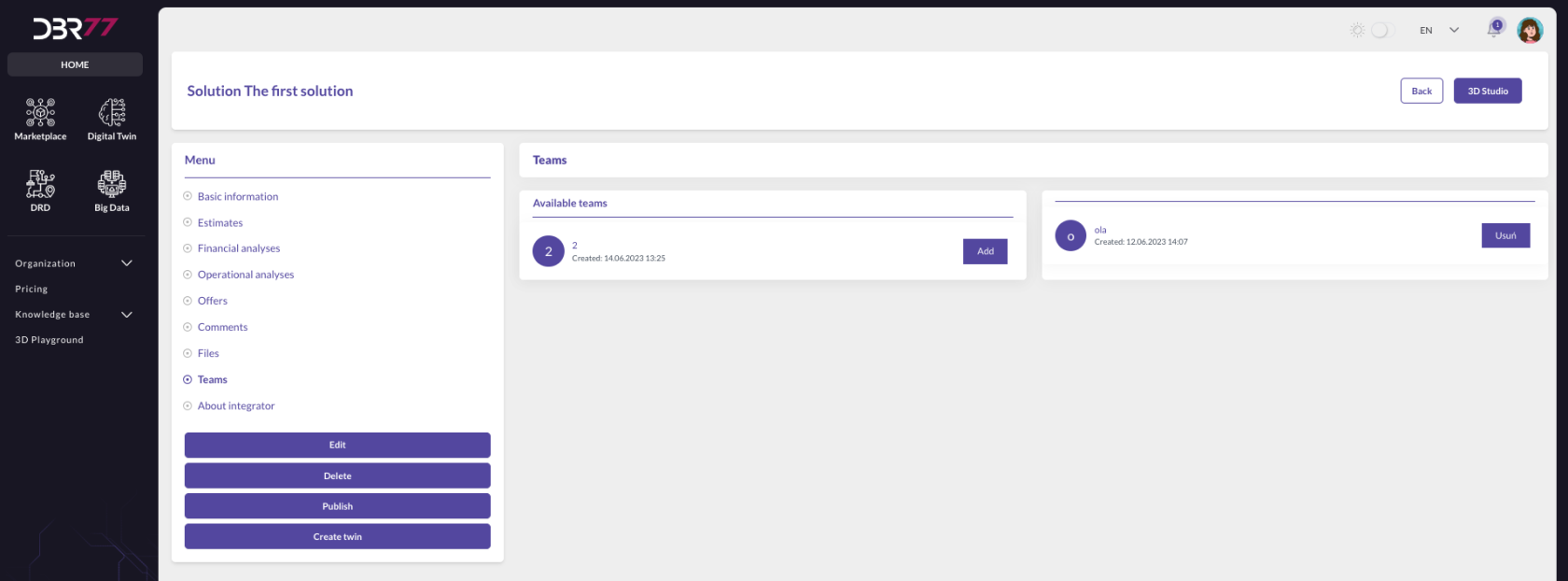
<div class="flex max-w-full flex-col flex-grow" id="bkmrk-zespo%C5%82y-%E2%80%93-widok-umo%C5%BC"><div class="min-h-8 text-message flex w-full flex-col items-end gap-2 whitespace-normal break-words [.text-message+&]:mt-5" data-message-author-role="assistant" data-message-id="14bb27ca-369b-4616-bc70-f244b3ae9460" dir="auto"><div class="flex w-full flex-col gap-1 empty:hidden first:pt-[3px]"><div class="markdown prose w-full break-words dark:prose-invert light">- **Teams**: Allows the addition of teams to the selected solution.

</div></div></div></div>[![Zrzut ekranu 2024-09-30 o 11.32.46.png](https://learn.dbr77.com/uploads/images/gallery/2024-09/scaled-1680-/K5MNGhpR5Wwz9iRW-zrzut-ekranu-2024-09-30-o-11-32-46.png)](https://learn.dbr77.com/uploads/images/gallery/2024-09/K5MNGhpR5Wwz9iRW-zrzut-ekranu-2024-09-30-o-11-32-46.png)

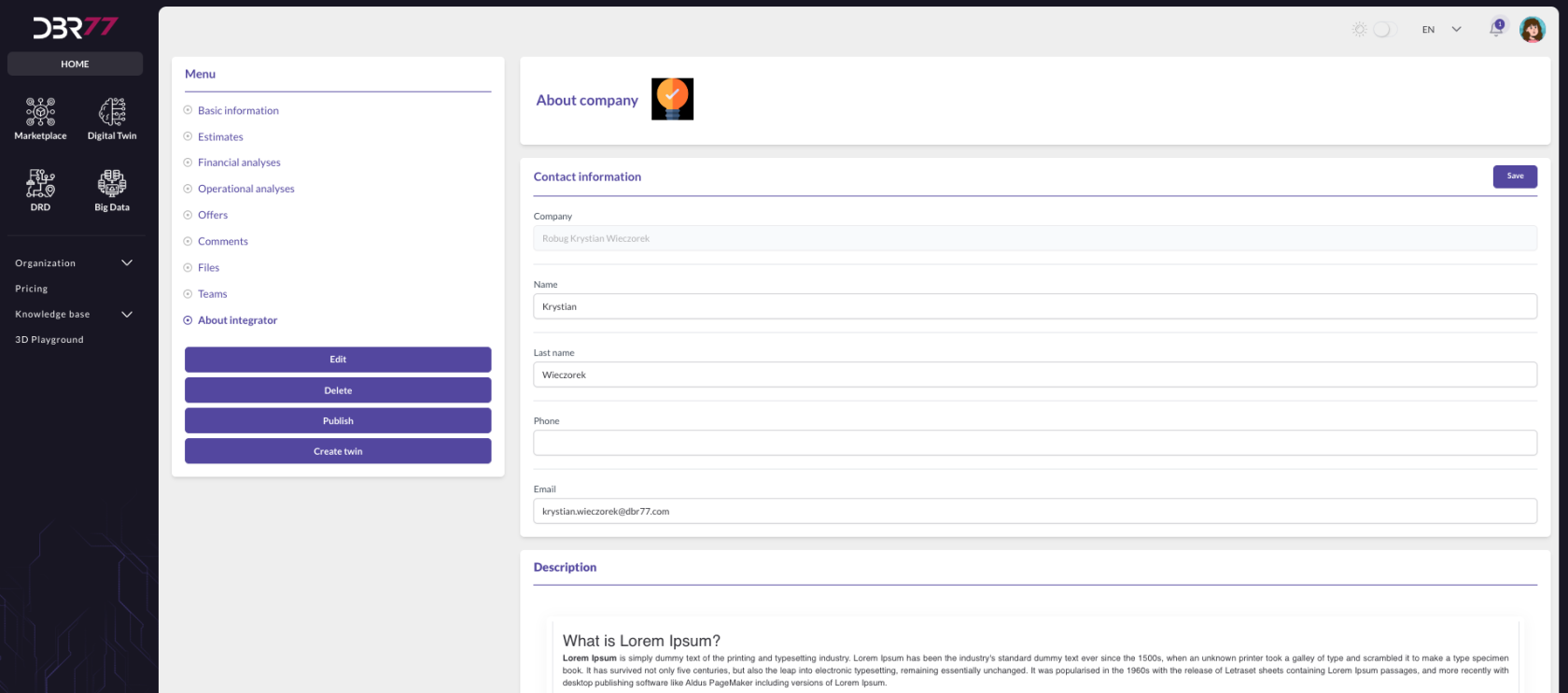
<div class="flex max-w-full flex-col flex-grow" id="bkmrk-o-integratorze-%E2%80%93-sek"><div class="min-h-8 text-message flex w-full flex-col items-end gap-2 whitespace-normal break-words [.text-message+&]:mt-5" data-message-author-role="assistant" data-message-id="14bb27ca-369b-4616-bc70-f244b3ae9460" dir="auto"><div class="flex w-full flex-col gap-1 empty:hidden first:pt-[3px]"><div class="markdown prose w-full break-words dark:prose-invert light">- <span lang="PL" style="position: relative; top: -1.0pt; mso-text-raise: 1.0pt; mso-no-proof: yes;">![](file:///C:/Users/zajac/AppData/Local/Temp/msohtmlclip1/01/clip_image002.gif)</span><span lang="PL" style="font-size: 10.0pt; mso-bidi-font-size: 10.5pt; line-height: 131%; font-family: 'Times New Roman',serif; mso-bidi-font-family: 'Gill Sans MT'; letter-spacing: 2.0pt; mso-font-width: 120%; mso-ansi-language: DE;"><span style="mso-spacerun: yes;"> **About the Integrator**:Displays the integrator’s portfolio, which can be managed in the **Organizations -&gt; About the Company** section.</span></span>

</div></div></div></div>[![Zrzut ekranu 2024-09-30 o 11.33.27.png](https://learn.dbr77.com/uploads/images/gallery/2024-09/scaled-1680-/Wy12j8rrVSNugNbk-zrzut-ekranu-2024-09-30-o-11-33-27.png)](https://learn.dbr77.com/uploads/images/gallery/2024-09/Wy12j8rrVSNugNbk-zrzut-ekranu-2024-09-30-o-11-33-27.png)

### **Action Buttons**

At the bottom of the screen, several action buttons are available:

- **Edit**:  
    Enables editing the solution's information.
- **Delete**:  
    Removes the solution.
- **Publish**:  
    Makes the solution accessible to other users.
- **Create Twin**:  
    Generates a digital twin based on the solution.

### **Additional Options**

- **Back Button**:  
    Located on the right side, it allows returning to the previous screen.
- **3D Studio Button**:  
    Opens the 3D editor for visualizing and editing the solution.

These features ensure efficient navigation and management of solution details on the DBR77 platform.